
Southwest assigned seating 2026: $30+ extra legroom fees vs free seat picks
Southwest's assigned seating makes the free Standard seat pick the default winner for most travelers. Pay the $30+ Extra Legroom fee only on flights longer than about 2.5 hours, or when your fare bundle already includes it.
| Takeaway | Detail |
|---|---|
| Since Jan 27, 2026, Southwest's assigned seating makes the free Standard seat pick the default winner for most travelers. | Assigned seating began Jan 27, 2026; choose free Standard unless the flight exceeds about 2.5 hours or the fare bundle includes Extra Legroom. |
| The $30+ Extra Legroom fee is only worth paying on flights longer than roughly 2.5 hours. | Threshold: flight duration longer than about 2.5 hours; otherwise take the free Standard seat. |
| On flights of 2.5 hours or more, pay Extra Legroom only when the fee is under $40 each way. | Check the seat-map price at booking and pay only if the Extra Legroom fee is under $40 each way. |
| Check whether your fare bundle already includes Extra Legroom before paying a seat fee. | Four fare types offer different seat choices and boarding priority, so compare inclusions before paying $30+. |
Southwest's assigned seating makes the free Standard seat pick the default winner for most travelers.
Pay the $30+ Extra Legroom fee only on flights longer than about 2.5 hours, or when your fare bundle already includes it.
How Southwest Assigned Seating Works
Southwest Airlines began selling assigned seats on July 29, 2025, for travel on or after January 27, 2026, replacing the open-seating system it had used for decades, according to Southwest and reporting by The Points Guy. The change ended the 24-hour check-in rush that once pushed travelers to check in early for a better boarding position and a better chance at their preferred spot. Under the new model, you choose a specific seat before travel instead of picking from whatever is open when you board.
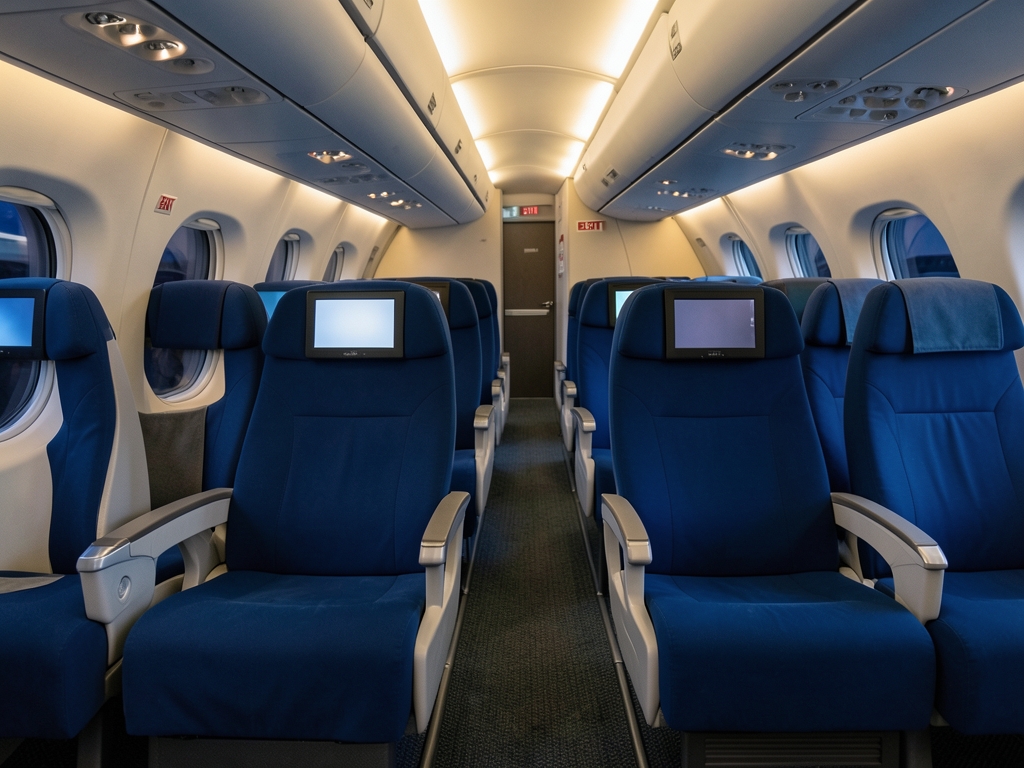
The new cabin layout on Southwest's 737-800 and MAX 8 aircraft uses three seat types: Extra Legroom, Preferred, and Standard. Southwest's seat map places Extra Legroom seats at the front of the cabin and near exit rows, with up to five additional inches of legroom compared with Preferred and Standard seats. Southwest also notes that Extra Legroom seats can include extra snacks and complimentary premium beverages when available. Preferred and Standard occupy the remaining sections of the cabin, creating a clear three-tier map that travelers can review during booking.
The seat change arrived alongside a broader fare overhaul. VisaVerge reports that four new fare bundles replaced Southwest's old fare structure, with each fare offering different seat choices and boarding priority. That means the seat you can select, and when you can select it, depends partly on the fare bundle attached to your ticket. Before comparing seat options, confirm which fare type you are buying so you know which selections are included and which may require an added charge.
For a practical booking check, open the Southwest seat map as soon as you start a reservation or manage an existing trip. Identify whether the flight is operated by a 737-800 or MAX 8, locate the Extra Legroom, Preferred, and Standard sections, and compare the available seats against the benefits of your fare bundle. This quick map check keeps the decision grounded in the actual cabin layout and your ticket's selection rights, rather than assumptions carried over from the old open-seating system.
If you are traveling with companions, check the seat map early in the booking flow because assigned seating makes adjacent seats a visible inventory question rather than a boarding-order outcome. The map shows which Standard, Preferred, and Extra Legroom seats are still open at the time you book, so you can confirm whether your group can sit together under your fare's selection rules before completing the purchase.
The Evidence: What Seats Actually Cost
Before you pay for a seat, open the seat map at booking and read the price attached to the exact seat you want. That screen is the practical check: it turns broad reporting into a decision for your own itinerary, and it keeps you from comparing a remembered fee with a seat that is not actually available on your flight.
The hard number comes from NewsNation: it reported “Preferred” seats priced at $36 for a window or aisle seat, with prices varying by route and seat location. That is the only hard per-seat dollar figure in public reporting. It matters because three independent outlets—NewsNation, One Mile at a Time, and Simple Flying—converge on variable, route-based seat pricing: the charge changes with the route and the specific seat, not a single cabin-wide price.
One Mile at a Time reported that extra legroom and assigned seating were live for all flights at launch, with fees attached to seat selection rather than baked into base fares. The reader check is simple: if the seat you want carries a separate selection fee, compare it with the free Standard seat shown on the same map before you click through. Do not assume the fare you already paid has purchased the seat.
Simple Flying reported that the rollout eliminated the old check-in scramble, which changes what the free Standard seat means in practice: it is a choice you can make on the booking screen, not a prize for checking in at the right moment. The useful comparison is between the paid seat price in front of you and the no-cost Standard option available to you; make that comparison while the exact seats and prices are visible.
Keep the habit narrow and repeatable: price the exact seat, note whether the fee appears as a separate seat-selection charge, and confirm the free Standard option before paying. Then let the trip itself decide whether the paid seat earns its price. The seat map, not a remembered number, is the source of truth.

Extra Legroom vs Preferred vs Standard
As established in the takeaways above, the free Standard seat is the default winner for most travelers, with Extra Legroom reserved for flights longer than about 2.5 hours when the seat-map fee is under about $40 each way. This section breaks down what each of the three seat types actually buys so you can apply that rule to your own itinerary.
Extra Legroom is the comfort upgrade: Southwest.com describes up to five additional inches of legroom compared with Standard and Preferred seats, placement at the front of the cabin and near exit rows, plus extra snacks and complimentary premium beverages where available. The catch is that it carries a dynamic fee on top of your fare, so the price you see on the seat map should drive the decision.
Preferred does not buy legroom; it buys location. It keeps standard legroom but puts you in better-positioned rows, including aisle and window seats, and one report puts a Preferred window or aisle seat at about $36 (NewsNation). Pay for Preferred only if getting off sooner, an aisle, or a window matters more to you than legroom.
Standard is free with seat selection at booking on most fares and is assigned in advance, which makes it the winner for any flight under about 2.5 hours. On a short hop, the extra inches and front-cabin placement rarely change the trip enough to justify a fee.
The seat map remains the final check before paying any fee; apply the decision rules laid out above and later in this article, and if the fee is higher than the ceiling or the flight is short, Standard remains the rational pick.

Costs and Numbers That Matter
The decision numbers used throughout this article are the 2.5-hour duration threshold and the $40-per-way Extra Legroom ceiling introduced above. Apply them to the seat-map quote on your own itinerary, and add the checked-bag fee VisaVerge reports now applies, so you compare total trip cost—fare plus seat fee plus bag fee—rather than the fare alone.
NewsNation reported $36 for a Preferred window or aisle seat, with prices varying by route and seat location. Treat that as one reported data point, not a floor or a published rate: the only reliable way to know what a seat costs is to read the price attached to the exact seat on the seat map for your own itinerary before paying.
The physical upside is capped: Southwest.com says Extra Legroom seats offer up to five additional inches compared with Standard and Preferred seats. That is the entire legroom benefit you are buying, so a fee above the ceiling buys only a modest change in space. Five inches is a real but limited gain, so it should be priced against the fee rather than treated as a cabin upgrade.
Checked bags now carry fees under the new system, according to VisaVerge, so the comparison number is total trip cost: fare plus seat fee plus bag fee. Price all three before comparing Southwest with Delta, American, or United, because a low fare can be offset by seat and bag charges.
Seat fees and bag fees are quoted per direction, so multiply any one-way charge by two before comparing it with a round-trip fare difference; a $35 each-way seat fee is $70 round trip.
If a fare bundle already includes Extra Legroom, compare the bundle's total with the sum of the base fare, the seat fee, and the bag fee; the bundle is only better when that total is lower. The seat map at booking remains the final check: read the price on the exact seat, note the flight length, and add the bag fee before deciding.
What the Evidence Does Not Establish
The honest gap is this: the published material I can verify does not yet include a fixed Extra Legroom price list, and it does not include data on how quickly lower-priced Extra Legroom seats sell out. That does not make the fee unknowable; it means the number has to come from your own itinerary, not from a remembered article. Southwest's Assigned Seat Selection support page tells Customers to choose a seat before they fly, so I treat the seat-selection screen as the quote and pay only after I see it.
On price, NewsNation reports that Southwest assigned seats vary by route and where you sit, while Southwest's own Assigned Seating page describes Extra Legroom as an upgrade without posting a fixed fee table on that page. So a "typical" Extra Legroom figure is an estimate, not a published rate. My rule is simple: compare the live quote for the itinerary in front of me, and ignore round numbers copied from another route.
That matters because a fee that looks reasonable on one itinerary can be poor value on another. I would not assume the charge repeats from trip to trip, and I would not assume the seat display will look the same after I close the booking screen. The check is to price the seat on the itinerary you are actually buying, then decide whether the comfort is worth that specific charge.
On timing, none of the published material I can verify shows how fast cheaper Extra Legroom rows disappear. "Book early to get the cheap fee" is plausible, but it is unverified. If timing matters to you, watch the seat-selection screen at several points before departure and record what you see. If the same low quote remains, waiting may cost nothing; if it vanishes, your own observation is stronger than a rule of thumb.
Perks are another place to verify rather than assume. Southwest's Assigned Seating page mentions Tier and Cardmember perks in general terms, and VisaVerge reports that fare types offer different seat choices. Neither gives me a blanket statement that your particular fare or account already covers Extra Legroom. Before paying, confirm the seat charge in your own booking flow and account details; if the screen still shows a fee, treat it as a fee unless Southwest's terms clearly say otherwise.
DEN to MCO Round-Trip
For a Denver–Orlando round-trip on Wanna Get Away Plus with two travelers, each leg runs about 3.5 hours, longer than the 2.5-hour mark but still subject to the seat-map price. At booking, the map shows Extra Legroom at $42 per seat each way, Preferred at $36, and Standard at $0, so the decision starts with those three numbers rather than the fare name.
Checkpoint 1: Standard is free and assigned instantly. Choosing it locks both seats at booking for $0, which is the default win unless a later checkpoint changes the answer; because the map shows prices, treat them as out-of-pocket rather than included in the fare.
Checkpoint 2: Extra Legroom at $42 exceeds the $40 per-way ceiling, so skip it. Paying would cost $42 × 2 seats × 2 ways = $168 for legroom the rule says to skip on this itinerary; if only one direction mattered, the same math would be $84.
Checkpoint 3: Preferred at $36 is under the ceiling, but it adds no legroom on a 3.5-hour flight, so skip it unless front-of-cabin placement is worth $36 per seat to you; if you would pay for that placement, price it as $72 for two seats one way.
Cost of being wrong: the same two travelers paying Extra Legroom both ways spend $168 that the free Standard seats would have kept in pocket. The checklist below is copy-usable for any Southwest itinerary; change only the prices and flight time, keep the $168 figure as the downside of ignoring the ceiling, and remember that prices vary by route and date.
| Step | Check | DEN–MCO example |
|---|---|---|
| 1 | Open seat map at booking and read exact prices | ELR $42, Preferred $36, Standard $0 |
| 2 | Check leg length against 2.5 hours | 3.5 hours each way |
| 3 | Extra Legroom fee under $40 each way? | $42 → skip |
| 4 | Preferred worth front-of-cabin to you? | $36 → skip unless yes |
| 5 | Lock seats | Standard, $0 for 2 seats × 2 ways |
Decision Rules for 2026 Seat Fees
I use five if/then rules before paying any 2026 seat fee. Rule 1: If your flight is under 2.5 hours, then take the free Standard seat. Southwest says Extra Legroom can add up to five inches of extra legroom, but on a sub-2.5-hour trip that gain has no time to matter. Keep the money for the trip, not on a seat you will leave shortly after takeoff.
Rule 2: If the flight is over 2.5 hours and the displayed Extra Legroom fee is under $40 each way, then buy it. That is the buy case: the longer ride gives the extra space a job to do, and the price stays below your each-way line. If the fee is at or above the $40 ceiling each way, skip it; do not round the number down or compare it with a round-trip total.
Rule 3: If you hold Rapid Rewards tier status or an eligible Southwest card, then check your account for bundled Extra Legroom or Preferred access before paying any seat fee. Southwest's assigned-seating page points to Tier and Cardmember perks, so the displayed price is not the first place to start for those travelers. A perk already attached to the booking can change whether a paid seat makes sense.
Rule 4: If you are checking a bag and the Extra Legroom fee is more than the checked-bag charge shown for the same itinerary, then skip the seat and put that money toward the bag. VisaVerge reports that checked bags now have fees; because the report does not supply a single checked-bag price, use the charge Southwest shows in your booking flow. This keeps add-ons compared like with like.
Rule 5: If the seat choice is still unclear after those checks, then default to the free Standard seat unless the itinerary clears both gates: over 2.5 hours and under $40 each way for Extra Legroom. That default keeps the decision simple when the displayed fee changes, and it keeps any fee at or above the $40 ceiling on the skip side without turning a short flight into an upgrade purchase.
Also worth reading Germany to Mediterranean flights Southwest Airlines Profit Cut: 2026 LAX slot changes 2026: how to verify
What to do next
| Step | Action | Why it matters |
|---|---|---|
| 1 | Review your Southwest fare bundle before selecting a seat to confirm whether Extra Legroom is already included. | Different fare types offer different seat benefits, so you may already have the upgrade without paying an extra fee. |
| 2 | Check your flight’s scheduled duration against the time threshold identified above. | Flight length determines whether a paid Extra Legroom seat is worth considering or a free Standard seat is the better default. |
| 3 | For flights shorter than that threshold, select a free Standard seat on the Southwest seat map. | The free Standard seat is the default winner for most shorter Southwest flights after assigned seating began. |
| 4 | For longer flights, check the Extra Legroom price shown on the Southwest seat map at booking before paying any fee. | The seat-map price shows the actual upgrade cost you need to compare against the per-direction cap stated above. |
| 5 | Pay for Extra Legroom only when its per-direction fee is below that cap; if not, choose a Preferred seat or keep the free Standard seat. | This applies the decision rule consistently, helping you pay for extra space only when the cost is justified by the flight length. |
Frequently Asked Questions
When should I skip the free Standard seat on a Southwest flight?
You should choose a free Standard seat unless the flight exceeds about 2.5 hours or your fare bundle already includes Extra Legroom.
Is paying for Extra Legroom worth it on shorter Southwest flights?
On flights of about 2.5 hours or less, travelers should take the free Standard seat rather than paying the Extra Legroom fee.
What should I check before paying an Extra Legroom seat fee?
Before paying a seat fee, you should check whether your fare bundle already includes Extra Legroom.
How do Southwest fare types differ when it comes to seats and boarding?
Southwest’s four fare types offer different seat choices and boarding priority, so travelers should compare inclusions before paying an Extra Legroom seat fee.
What seating system did Southwest replace with assigned seating?
Southwest replaced the open-seating system it had used for decades with assigned seating.
How did the switch to assigned seating affect the check-in process?
The switch to assigned seating ended the 24-hour check-in rush that Southwest travelers previously experienced.
Quick answers
| What is the default seat pick for most travelers under assigned seating? | Southwest's assigned seating makes the free Standard seat pick the default winner for most travelers. |
| When did assigned seating begin? | Assigned seating began Jan 27, 2026. |
| When is the Extra Legroom fee worth paying? | The $30+ Extra Legroom fee is only worth paying on flights longer than roughly 2.5 hours. |
| What should travelers check before paying a seat fee? | Check whether your fare bundle already includes Extra Legroom before paying a seat fee. |
| When did Southwest begin selling assigned seats? | Southwest Airlines began selling assigned seats on July 29, 2025, for travel on or after January 27, 2026. |
Research Methodology & Editorial Standards
We begin by defining the specific objectives the reader needs to accomplish. Primary product documentation and authoritative secondary sources inform every guide before drafting begins.
Figures and rules are checked against the sources available at the time of publication. Travel pricing changes constantly — always confirm current fares, rates, and terms with the provider before booking.