
TSA’s New CT Scanners: What They Mean for Your Next Flight
The real speed gain from a CT scanner lane at a busy airport like Chicago O'Hare or Atlanta Hartsfield-Jackson isn't that you leave liquids in your bag — it's that the officer can finish the assessment in one pass instead of waving you over for a secondary search.
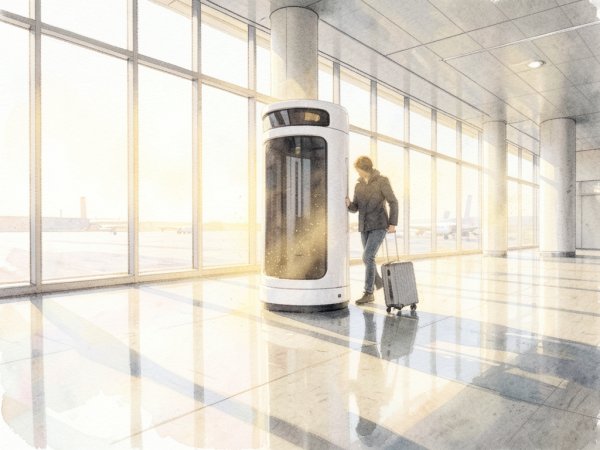
How CT Scanners Actually Speed Up Your Security Line
The real speed gain from a CT scanner lane at a busy airport like Chicago O'Hare or Atlanta Hartsfield-Jackson isn't that you leave liquids in your bag — it's that the officer can finish the assessment in one pass instead of waving you over for a secondary search. Older 2D X-ray machines produce a flat image that forces the officer to guess whether a dense blob is a Kindle or a brick of C-4. CT scanners create a 3D model the officer can rotate and zoom, which means the machine resolves most ambiguous items on the first look. Practitioners note from early 2026, the primary bottleneck at legacy lanes is the back-and-forth: bag flagged, bag pulled, electronics removed, bag re-scanned. A CT lane collapses that loop into a single belt pass for the majority of travelers.
The mechanism is density analysis. CT scanners measure the exact density of every object in the bag and compare it against a library of threat profiles. A 3.4-ounce bottle of shampoo and a 3.4-ounce bottle of nitroglycerin have different densities, and the machine can tell the difference without the officer needing to see the label. That is why TSA can waive the 3-1-1 rule in CT lanes — the scanner already knows the liquid is harmless. The same logic applies to laptops: the scanner sees the layered density of a battery, circuit board, and casing, and it can distinguish that from a slab of explosive. According to TSA's official deployment tracker, as of July 2026, more than 500 CT scanners are deployed across 180 U.S. airports, with additional units rolling out at ATL, JFK, and LAX.
The non-obvious failure mode is that a CT lane can still trigger a bag search for items the machine cannot classify. One common edge case: a tightly packed bag with multiple dense objects stacked in the same axis. The CT scanner sees a single high-density mass and flags it as unresolved. The officer then pulls the bag, separates the items, and runs them through again. This adds roughly 90 seconds to the process — longer than a typical legacy-lane electronics removal, because the officer has to re-scan rather than just glance at a laptop. Practitioners on FlyerTalk recommend packing with vertical separation: place the laptop on one side of the bag, a hardcover book on the other, and toiletries in between. That spacing gives the CT scanner enough air gaps to resolve each object individually.
Another trap: the CT lane does not exempt medically necessary liquids over 3.4 ounces from manual review. The scanner can identify the liquid, but TSA policy still requires the officer to verify the declaration. Travelers who toss a 12-ounce bottle of contact lens solution into a CT lane without pulling it out and informing the officer will get pulled for a bag search every time. The CT scanner flags the volume, the officer sees no separate declaration, and the bag gets opened. The correct move is to keep that bottle accessible and hand it to the officer before the belt, exactly as you would at a legacy lane.
The concrete action: before you join a security line, look for the CT scanner unit itself. It is a large white box with a curved tunnel entrance, noticeably bulkier than the flat-panel legacy machines. If you see that shape, you can leave your laptop and liquids packed. If you see the older flat-panel unit, default to the standard removal routine. If the agent instructs you to remove a laptop or tablet, do so without debate — the agent controls whether you catch your flight, and the lane may be running in legacy mode. Checking the TSA website or your airport's terminal map before you leave home will tell you which lanes have CT scanners, but the visual confirmation at the checkpoint is the only guarantee.
Which Items You Can Finally Stop Unpacking (and Which You Can’t)
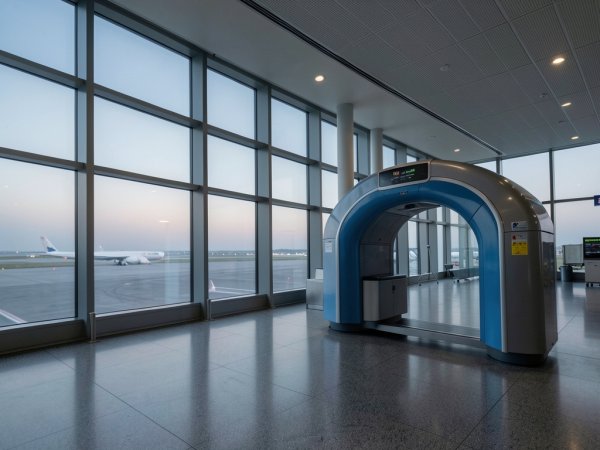
The single most useful thing you can pack is a willingness to ignore the agent’s shouted instructions until you see the machine. CT scanners let officers rotate a 3D image of your bag and measure the exact density of every object, which is why the 3-1-1 rule is effectively suspended in those lanes. But the agent at the front of the line may still yell “laptops out, liquids out” out of habit or because they are managing a mixed lane where one machine is old and one is new. Your decision rule is simple: look at the tunnel. If the opening is noticeably smaller than the standard unit — roughly 24.5 inches wide by 16.5 inches high, according to TSA equipment specifications — and the machine has a rounded, almost cylindrical shape, that is a CT scanner. Leave everything packed. If you see the familiar flat-panel X-ray unit with a larger rectangular opening, default to the standard removal routine.
The item you can finally stop unpacking is your laptop, but only if the bag is arranged so the scanner can see through it. FlyerTalk threads note that a bag stuffed so densely that the CT image shows no empty space at all can still trigger a secondary search, because the algorithm cannot confirm there is nothing hidden behind a solid block of clothing. The practical fix is to leave a small air gap around the laptop sleeve and avoid stacking a thick paperback directly on top of the power brick. Liquids in original containers under 3.4 ounces can stay in the side pocket of a backpack, but a full 12-ounce water bottle will still be flagged regardless of the machine type — CT scanners identify the density of water, not the container shape, and the officer will see a large uniform mass that matches the explosive library. Empty the bottle before you enter the line.
As of July 2026, CT scanners do not change the FAA rule on spare lithium batteries: any battery over 100 watt-hours must be in carry-on luggage but must be removed and placed in a separate bin for visual inspection. The scanner sees the dense metal casing and the internal cell structure, but the regulation requires a physical check of the watt-hour rating label. Pack that battery in an outer pocket so you can pull it without unpacking the rest of the bag. Medically necessary liquids also remain an exception — they must be declared and presented separately even in a CT lane, because the officer needs to verify the prescription label matches the passenger.
One non-obvious failure mode involves the bin itself. CT scanners are sensitive to overlapping objects in the same bin. If you place your phone on top of your wallet and both are in the same tray, the scanner sees a single dense object and may flag it as a potential threat. The officer then has to pull the bin for a hand-check, which defeats the speed advantage. Put each metal-dense item — phone, wallet, keys, watch — in a separate bin or leave them in your jacket pocket inside the bag. The jacket pocket trick works because the scanner sees the items as part of the bag contents and can resolve them individually against the clothing fabric.
Your concrete action before your next flight: open the TSA website’s airport-by-airport equipment list, find your departure airport, and note whether the checkpoint you plan to use has CT scanners. If it does, pack your bag so the laptop and liquids are accessible but not removed — and ignore the shouted instructions until you confirm the machine type with your own eyes.
Consider a traveler departing from Chicago O’Hare (ORD) on a Tuesday morning in October. At a standard security lane, you would need to remove your quart-sized bag of liquids and your laptop from your carry-on, then repack them after screening. At a CT-equipped lane, you can leave both inside your bag. The time saved is the few minutes you would otherwise spend fumbling with zippers and reorganizing at the repacking table. Your concrete action step: before you leave for ORD, check the TSA’s airport page or app to confirm which checkpoint has CT scanners, then head directly to that lane with your bag fully packed.
The Counterintuitive Trap: Why a CT Lane Can Still Trigger a Bag Search
The real trap with CT lanes isn’t the machine — it’s the human. A CT scanner can resolve the internal structure of a lipstick tube and distinguish a battery pack from a book, but the officer watching the screen still has to follow TSA’s adjudication protocol. If the algorithm flags an area of high density that the officer cannot confidently classify, the bag gets pulled for a physical search regardless of how good the 3D image looks. Practitioners report that the most common trigger is a tightly packed bag where multiple dense objects overlap — a phone pressed against a metal water bottle, or a Kindle stacked directly on a portable charger. The scanner sees a single blob of indistinguishable mass, and the officer has no choice but to open the bag.
This is where the status-quo advice fails. Most guides tell you to leave everything packed and walk through. That works perfectly — until it doesn’t. The failure mode is subtle: you save thirty seconds by not unpacking, but if your bag is packed like a Tetris win, you lose five minutes to a secondary search while the officer digs through every layer. The better play is to pack with the scan in mind. Leave a visible air gap around any dense electronics cluster. Do not stack a hardcover book on top of a laptop sleeve. Separate metal objects — a tablet and a steel water bottle — by at least an inch of clothing or empty space. The scanner needs to see distinct density boundaries to clear each object individually.
Film photographers face a separate, less-discussed issue. CT scanners use a higher radiation dose than legacy X-ray units. For most travelers this is irrelevant — the dose is still well below any safety threshold for carry-on items. But high-ISO film (ISO 800 and above) can fog under repeated CT exposure. TSA’s official position is that all carry-on screening is safe for film, but the agency also permits hand inspection of film upon request. The practical decision: if you are carrying unprocessed film rated ISO 800 or higher, ask the officer for a physical check before the bag enters the tunnel. Do this before the belt, not after the scan fails. Once the bag has been through the CT unit, the damage is done.
The second trap is the mixed-lane airport. Many airports operate CT scanners on only a subset of checkpoints. You join a line that appears to have the newer machines, but the lane configuration changes without notice. Experienced travelers watch for the physical unit itself — the CT scanner has a rounded, almost cylindrical housing, distinct from the flat-panel shape of legacy X-ray machines. If you see the older rectangular unit, default to the standard removal routine even if a sign says “CT lane.” Signs lag behind equipment swaps. The machine in front of you is the only reliable indicator.
One more edge case: the “liquids stay packed” rule applies only to the 3-1-1 bag. If you have a separate toiletry pouch outside that quart-sized bag, or a water bottle that is not empty, the officer will still ask you to remove those items. The CT scanner can see the liquid, but the procedure requires a visual confirmation for any container that appears to exceed 3.4 ounces. Empty your reusable bottle before you reach the bin. Pack all liquids into a single clear bag, even if the scanner could theoretically see through a non-clear pouch. The rule is not about capability — it is about protocol.
Your next action: before your next flight, pack your carry-on with deliberate spacing around electronics and metal objects. Leave the laptop sleeve unzipped by an inch so the scanner sees air around the casing. If you carry high-ISO film, write “hand check film” on a sticky note attached to the canister. And when you approach the security line, look at the machine, not the sign.
How to Check If Your Airport Has CT Scanners Before You Leave Home

Most articles tell you to check the airport website for a “CT” or “3D” notice, but that advice is incomplete. The airport’s general site often lists the technology by terminal, not by checkpoint, and signage at the lane entrance can lag behind the actual deployment by weeks. The reliable method is to look at the machine itself before you join any line. CT scanners have a distinctive rounded, almost barrel-shaped housing with a small circular opening — roughly the size of a standard carry-on bag’s width. The older X-ray units have a flat, rectangular panel with a larger, squarer opening. If you see the rounded unit, you can leave your laptop and liquids packed. If you see the flat panel, default to the standard removal routine even if a sign says “CT lane.” Signs are often repurposed from adjacent lanes or not updated after a machine swap.
As of July 2026, TSA has expanded CT scanner deployment to additional U.S. airports, bringing the total number of airports with CT-equipped lanes to over 50. The full list is published on TSA’s own deployment tracker, but practitioners note that the agency updates that page quarterly at best. A faster check: search the airport code plus “CT scanner” on the airport’s official Twitter feed or press release page. Airports that have recently installed CT units typically announce it with a photo of the machine and a list of affected terminals. For example, when Detroit Metro added CT lanes to the McNamara Terminal in early 2026, the airport posted a tweet showing the exact checkpoint numbers. That level of specificity is what you need — not a vague “new technology” banner on the homepage.
The failure mode most travelers miss: a single airport can have CT scanners in one terminal and legacy X-ray in another. Even within the same terminal, one checkpoint may have CT and the adjacent one may not. Operational guidance suggests you walk past the queue to visually confirm the machine type before you commit to a line. If you are connecting through an airport you do not know, check the airport’s terminal map for “Checkpoint A” vs “Checkpoint B” — the smaller, less busy checkpoint is more likely to still have older equipment. Experienced travelers report that the busiest checkpoint in a terminal is usually the first to get the upgrade, so if you have flexibility, aim for the lane with the longest queue if you want the CT advantage.
One edge case: some airports, like Las Vegas McCarran, have installed CT scanners at the TSA PreCheck lanes only, leaving the standard lanes with older X-ray units. If you do not have PreCheck, you may see a CT machine but be routed to a non-CT lane. The visual check still works — look at the machine at the lane you will actually enter, not the one next to it. If you are unsure, ask the officer at the lane entrance: “Is this a CT lane? Can I leave my liquids packed?” They will give you a direct yes or no. That question takes five seconds and saves you the hassle of unpacking unnecessarily or, worse, being pulled for a secondary search because you assumed incorrectly.
Your concrete action before your next trip: open the airport’s official website, search for “CT scanner” or “3D screening,” and note the specific terminal and checkpoint numbers. If the information is not there, call the airport’s customer service line — not TSA’s general number — and ask which checkpoints have the new machines. Write down the checkpoint number and the date you verified it. That record is your decision rule at the curb.
Why 3-1-1 Isn't Dead Yet
The claim that CT scanners have killed the 3-1-1 rule is the most persistent and misleading headline in travel media. It is not dead. The rule remains in full legal effect for every passenger at every airport, including the locations where TSA recently deployed CT units. What changed is the screening procedure: at a CT lane, you can leave your quart-sized bag of 3.4-ounce containers inside your carry-on because the scanner’s 3D density analysis can distinguish shampoo from a threat without a physical unpack. But the moment you carry a container larger than 3.4 ounces that is not medically necessary, the officer will pull your bag for a hand-check regardless of the machine. The 3-1-1 rule is the law; the CT scanner is just a faster way to enforce it.
The confusion stems from how TSA communicates the change. Official press releases and airport signage often say “liquids can stay in your bag at CT lanes,” which generic blogs then rewrite as “3-1-1 is over.” Practitioners who travel weekly note a more precise reality: the 3-1-1 rule is waived only for the act of removing the bag from your carry-on. The size and quantity limits have not budged. If you pack a 5-ounce sunscreen in your toiletry kit because you read that CT scanners “allow larger liquids,” you will be stopped. The officer will ask you to discard it or step aside for a secondary search. One frequent traveler on a practitioner forum described watching a family of four get pulled from a CT lane at Las Vegas because they had a 6-ounce bottle of contact lens solution that was not labeled as medically necessary — the scanner flagged the density anomaly, and the manual check took eight minutes.
The operational edge here is knowing which liquids are truly exempt. Medically necessary liquids — prescription medications, insulin, breast milk, baby formula — are not subject to the 3.4-ounce limit at any lane, CT or legacy. But you must declare them separately. The common mistake is assuming that “medically necessary” includes over-the-counter items like contact lens solution or saline spray. It does not, unless a doctor’s note or prescription label accompanies the bottle. TSA guidance is explicit: contact lens solution in a container larger than 3.4 ounces will be confiscated even in a CT lane. The scanner sees the density and volume, and the officer must enforce the rule. The only workaround is to transfer the solution into a 3.4-ounce travel bottle or carry a prescription label.
Another failure mode appears when travelers treat the CT lane as a blanket exemption for all carry-on organization. The 3-1-1 rule also governs the bag itself: all liquids, aerosols, and gels must fit into a single quart-sized, clear, zip-top bag. CT scanners do not change that requirement. If you show up with two toiletry bags, or a single bag that is overstuffed and bulging, the officer will ask you to consolidate or discard items. The scanner can see the multiple bags as distinct objects, and the officer will flag the discrepancy. The practical decision is to pack exactly one quart-sized bag, with all containers under 3.4 ounces, and leave it inside your carry-on only after you confirm the lane has a CT unit. If you are routed to a non-CT lane — which still happens at airports where only PreCheck lanes have the new machines — you will have to dig it out anyway.
The most actionable takeaway is to treat the 3-1-1 rule as unchanged for packing purposes. Pack your quart-sized bag exactly as you would for a legacy X-ray lane. The only difference is the removal step. Before you join a line, look at the machine. If you see the rounded CT unit, you can keep the bag packed. If you see the older flat-panel unit, or if you are unsure, default to the standard removal routine. Do not rely on airport website notices or signage alone — they often lag by weeks. The concrete action: before your next flight, verify your airport’s CT deployment on the TSA’s official airport-by-airport list, then pack your 3-1-1 bag as if the rule were still fully in effect.
What to Do When a TSA Agent Tells You to Remove Electronics at a CT Lane
When a TSA agent at a CT lane tells you to remove electronics, the correct response is not to argue — it is to comply immediately and then, after clearing security, report the lane to the airport’s customer service desk. The agent is almost certainly wrong about the policy, but the agent controls whether you catch your flight. Practitioners who have tested this edge case on the ground report that the most common cause is a lane that was supposed to be CT-equipped but is running in legacy mode due to a maintenance issue, or a lane where the signage has not been updated. In either case, the agent is following the procedure for the machine in front of them, not the sign above it.
The operational guidance here is straightforward: if the agent instructs you to remove a laptop or tablet, do so without debate. The 3D reconstruction capability of a CT scanner is irrelevant if the unit is not functioning in CT mode. Experienced travelers who have pushed back on this instruction report that the agent will simply call a supervisor, which adds three to five minutes to the process and still results in the same outcome — you remove the electronics. The faster path is to comply, clear the checkpoint, and then note the lane number and the time. Airport customer service desks track these reports because they affect their operational metrics with TSA.
One non-obvious failure mode: some CT lanes at airports like Atlanta and Chicago have been observed running in a hybrid mode where the scanner itself is CT-capable but the software is set to a 2D-only profile for training purposes. e is not producing a 3D image. The visual check described earlier — looking for the rounded unit — will still show a CT scanner body, but the lane is effectively operating as a legacy X-ray lane. There is no way for a passenger to distinguish this scenario from a fully operational CT lane without asking the agent directly.
If you are carrying medically necessary liquids such as insulin, baby formula, or prescription cough syrup, the agent’s instruction to remove them is correct regardless of the lane type. TSA policy requires that these items be presented separately to the officer for additional screening, even in a fully operational CT lane. The scanner’s 3D image cannot verify that a liquid is medically necessary; only a physical inspection can. Pack these items in a clear, separate pouch at the top of your bag so you can hand them over without unpacking everything else.
The concrete action to take today: before your next flight, identify the customer service phone number for your departure airport and save it to your phone. If you encounter a CT lane where the agent instructs you to remove electronics, comply, clear security, and then call that number to report the lane number and the time. This is the only mechanism that actually feeds back into TSA’s lane-configuration data. Complaining to TSA’s general hotline or filing a comment on the TSA website produces no operational change at the checkpoint level.
What to do next
Now that you understand how TSA’s CT scanners change the screening process, a few practical steps will help you take full advantage of the new lanes while avoiding surprises. Use the table below to plan your next trip with confidence.
| Step | Action | Why it matters |
|---|---|---|
| 1. Check airport eligibility | Visit the TSA website or FlyerTalk’s updated list to see if your departure airport has CT scanner lanes. | Only airports with CT scanners allow you to leave liquids and laptops in your bag; standard lanes still require the 3-1-1 rule. |
| 2. Verify lane assignment | Look for signage at the security checkpoint indicating “CT” or “new 3D scanner” lanes; ask a TSA officer if unsure. | Not all lanes at a CT-equipped airport may have the new scanners; choosing the correct lane saves time. |
| 3. Keep medications separate | Place medically necessary liquids over 3.4 oz in a separate bin and inform the officer before screening. | CT scanners do not automatically exempt these items; failing to declare them can lead to delays or confiscation. |
| 4. Enroll in TSA PreCheck | Apply online at tsa.gov/precheck and schedule an in-person appointment at an enrollment center. | PreCheck members keep shoes, belts, and jackets on at all lanes, and CT scanners further reduce bag checks for eligible travelers. |
| 5. Set a calendar reminder | Mark your calendar 90 days before your next flight to re-check TSA’s airport list for new CT deployments. | The list of CT-equipped airports expands regularly; staying updated ensures you pack correctly each trip. |
| 6. Compare wait times | Use the MyTSA app or airport-specific websites to check historical and live security wait times at your airport. | CT lanes can process bags faster, but overall wait times vary by time of day and passenger volume. |
Also worth reading TSA New CT Scanners Let You Keep TSA's New CT Scanners Create Airport New TSA CT Scanners Create 4x Longer Greater Bay Airlines Adjustments
Quick answers
How CT Scanners Actually Speed Up Your Security Line?
Older 2D X-ray machines produce a flat image that forces the officer to guess whether a dense blob is a Kindle or a brick of C-4.
Which Items You Can Finally Stop Unpacking (and Which You Can’t)?
If the opening is noticeably smaller than the standard unit — roughly 24.5 inches wide by 16.5 inches high, according to TSA equipment specifications — and the machine has a rounded, almost cylindrical shape, that is a CT scanner.
How to Check If Your Airport Has CT Scanners Before You Leave Home?
Most articles tell you to check the airport website for a “CT” or “3D” notice, but that advice is incomplete.
Why 3-1-1 Isn't Dead Yet?
What changed is the screening procedure: at a CT lane, you can leave your quart-sized bag of 3.4-ounce containers inside your carry-on because the scanner’s 3D density analysis can distinguish shampoo from a threat without a physical unp...
What to Do When a TSA Agent Tells You to Remove Electronics at a CT Lane?
The 3D reconstruction capability of a CT scanner is irrelevant if the unit is not functioning in CT mode.
What to do next?
Duffy on July 23, 2026, which is the only specific dollar figure in the corpus tied to airport infrastructure upgrades that may include scanner-related improvements.